
Admin Dashboard Templates: Two Picks and When to Build Your Own
By Manob Editorial ·
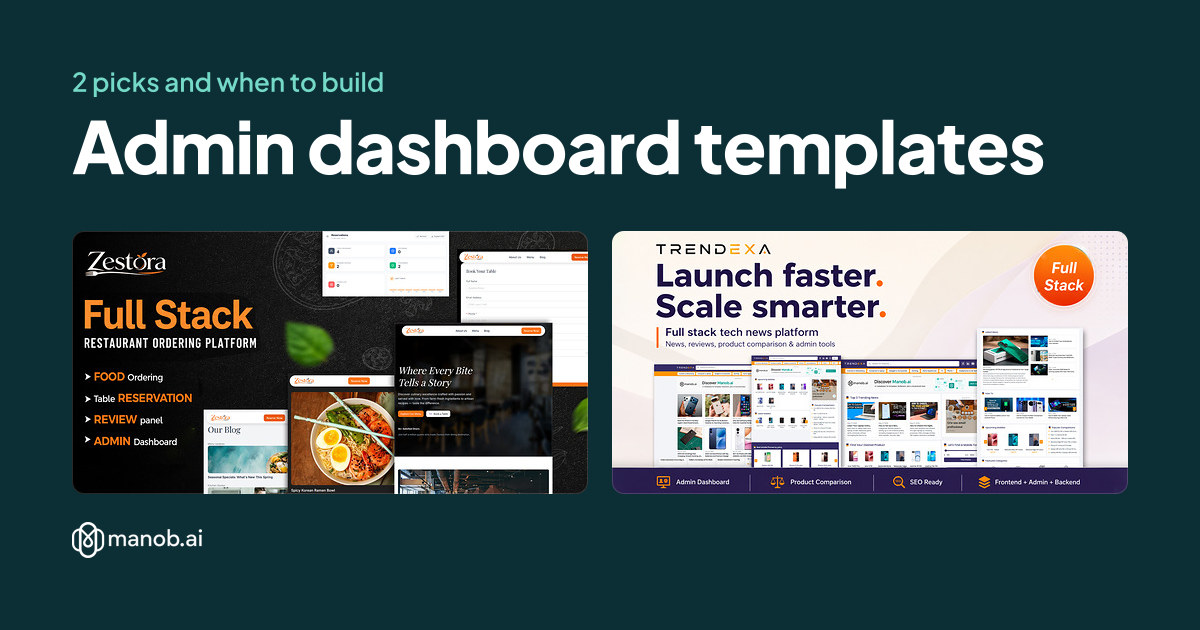
An admin dashboard template gives you a back-office layout for managing users, bookings or content, so you don't build that shell from scratch. Manob has only two products named as admin dashboards: a Next.js restaurant booking dashboard and a Next.js news CMS with a full admin panel. Pick one only if its purpose matches yours, and plan a developer to run it.
An admin dashboard template is a ready-made set of screens for staff to sign in, move around a menu and manage records in tables and forms. This guide covers the two admin dashboard products on Manob and explains where a template helps and where it doesn't. The list is short because the catalog names only two products as admin dashboards.
What does an admin dashboard template include?
Most admin templates include a sign-in screen, a sidebar menu, a summary page with numbers, tables with search and sorting, and forms for adding or editing a record. Some add charts, role-based views or a settings page. The useful question is which of those screens your staff will use every day. Check the demo for those screens first, because a dashboard with many charts can hide a missing table or form.
How did we pick these two?
We searched the Manob catalog for products whose name says admin, dashboard or admin panel. Two matched, and both are full-stack Next.js projects rather than static screens. We didn't add general management or accounting templates, since their names don't say admin dashboard. If one of those fits your work, open its preview and check the screens before you decide. Every product on Manob is manually reviewed before approval, and every item can be previewed before purchase. Prices come from each seller's inventory and appear in the table below.
| Template | Type | Built with | Price from | Live demo |
|---|---|---|---|---|
| Zestora – Restaurant Website and Booking Admin Dashboard NextJS – Prisma | React template | Tailwind CSS, Next.js | $39 | Demo |
| Trendexa — Fullstack Next.js Mobile Review and Gadget News CMS with Full Admin Panel | React template | Next.js | $44 | Demo |
Which pick fits a restaurant or booking business?
Zestora, listed as a restaurant website and booking admin dashboard, is built around a restaurant that takes bookings. The product name lists Next.js and Prisma, so the admin side is meant for a site with a database behind it. It suits a restaurant or a small service business that manages reservations and wants the public site and the admin tools in one project. If you only need a brochure site, a restaurant website template will serve you better.
Which pick fits a content or news business?
The Trendexa listing describes a Next.js mobile review and gadget news CMS with a full admin panel. That suits a publisher who writes reviews and news posts and needs staff to manage them from one place. The admin panel is the reason to choose it over a blog theme. If you publish a few posts a month, a standard WordPress blog theme may be less work to run.
Do admin dashboard templates need a developer?
Yes, usually. Both picks are Next.js projects, so someone needs to install the dependencies, connect the database, set up sign-in and deploy the app. A non-technical owner can use the finished admin screens, but the setup and every change to the code need a developer. Budget for that work before you buy, since a template saves screen design time, not server setup.
Which license does an admin dashboard need?
A Regular License covers a single end product where end users aren't charged. An admin dashboard you run for your own business is one end product, so the Regular License can fit. If you build a dashboard product that paying customers use, the end users are charged, and the Extended License applies. Under either license, you can't redistribute the source files as they are. Each product lists both a Regular and an Extended price in the table.
How should I compare admin templates?
- Sign-in and roles. Check how the demo handles logins, and whether it separates admin, editor and viewer views.
- Tables with search and sorting. Staff spend most of their time in tables, so test them with a long list in the preview.
- Forms with validation. Add or edit a record in the demo and check the error messages and the save step.
- Mobile layout. Open the admin screens on a phone. Staff often check orders or bookings away from a desk.
- Data source. Confirm whether the demo uses sample data or a real database setup, and what the project needs to run.
When should I build my own admin panel instead?
A template gives you the screens, but it won't design your workflow. If your business has unusual approvals, scheduling or reporting rules, a custom build from a developer will fit better than a generic admin layout. A template also won't handle your user accounts, billing or permissions beyond the demo's setup. For an internal tool with a few screens, a low-code internal tool may be quicker to set up than a Next.js project.
Browse the full set of UI templates on Manob if these two don't match your work. To see what a design file for a dashboard looks like before you buy, read our guide to Figma UI kits, and for the difference between a UI kit and a full template, see what a UI kit is. If the dashboard is part of a subscription product, SaaS website templates cover the public pages around it.
Frequently asked questions
What is the best admin dashboard template on Manob?
Manob has two products named as admin dashboards. Zestora suits a restaurant or booking business. The Trendexa full-stack CMS suits a publisher that needs an admin panel for articles and reviews. Choose by the purpose, then check the admin screens in each preview.
Can a non-developer run an admin dashboard template?
A non-developer can use the admin screens once the project is running, but setup usually needs a developer. Both picks are Next.js projects that need a database and deployment. Plan that help before you buy, not after.
Do these templates need Next.js?
Both of the admin dashboard products on Manob are Next.js projects. A Next.js project needs Node.js to run, so your developer has to be comfortable with that stack. If your team works in plain HTML or WordPress, an admin template in another stack will be a better match.
Which license do I need for an admin dashboard?
An admin dashboard you run for your own business is a single end product where end users aren't charged, so the Regular License can fit. If you sell the dashboard as part of a product that customers pay for, the Extended License applies. Source files can't be redistributed as they are under either license.
How long is seller support after I buy?
Every purchase includes 6 months of seller support through Manob's ticket system. You can extend it at 30% before expiry, or at 75% after expiry. Check the product page for the current terms before you buy.
Why does the catalog have so few admin dashboard templates?
Manob lists products by their names and listings. Only two names say admin dashboard or admin panel, so only two appear here. Other products may include an admin area, so open each preview to check before you assume a template has one.