
How to Move Your ThemeForest and CodeCanyon Items to Another Marketplace
By Manob Editorial ·
You can sell your ThemeForest and CodeCanyon items on other marketplaces without leaving Envato. Envato's author terms are non-exclusive, and the 50% author fee stays the same when you sell elsewhere. Moving is really copying: download your own file, rebuild the listing, keep the Envato one live. On manob.ai, the free manob Migrator does it for every item in one go.
Can you sell ThemeForest items on other marketplaces?
Yes. Envato's Market Author Terms say you list items "on a non-exclusive basis", and that the author fee applies "irrespective of whether you make your Items available elsewhere". Since July 1, 2026, every Envato Market author earns the same 50% of the item price, so selling elsewhere costs you nothing on ThemeForest or CodeCanyon. Older guides that warn you'd lose an "exclusive" rate describe the rules before that change, when exclusive authors paid a lower fee (Envato's announcement has the details).
Some things stay where they are, whichever marketplace you add:
- Your history: sales counts, ratings, reviews, comments and author badges belong to your Envato profile. A new marketplace starts your items at zero.
- Your existing buyers: people who bought on ThemeForest keep downloading and getting support there, under the Envato license they bought.
- Your Envato listing: nothing has to be removed, and it's better not to. Envato says a permanently removed item can't be offered for download again.
One Envato rule to know: your item page there can't link to the same item for sale on your own site or another platform. List it elsewhere, but don't advertise the other listing on ThemeForest.
What a new listing needs from each item
Whether you copy by hand or with a tool, every item needs the same parts. Here is where each one lives on ThemeForest or CodeCanyon and what to watch for on the new marketplace:
| Part | Where it is on Envato | What to check |
|---|---|---|
| Main file (ZIP) | Your portfolio page, signed in: the Download link next to each item | It's the exact ZIP buyers get. manob.ai takes up to 200 MB. |
| Name and description | Item page | Remove Envato-only lines, like "rate us 5 stars" or links to your ThemeForest support tab. |
| Preview image and screenshots | Item page and its Screenshots tab | manob.ai uses one 1110 × 566 thumbnail and up to 6 screenshots. |
| Live demo | The Live Preview button | Link your own demo address, not the preview.themeforest.net frame, and take out "Buy now" buttons that point back to Envato. |
| Documentation | Usually inside the ZIP or on your own site | Buyers and reviewers need a working link. |
| Prices | Item page: Regular and Extended License | Decide whether to match them or not. See Regular vs Extended License. |
| Category and tags | Item page attributes | Categories differ between marketplaces, so map each item by hand. |
The one-click way: manob Migrator
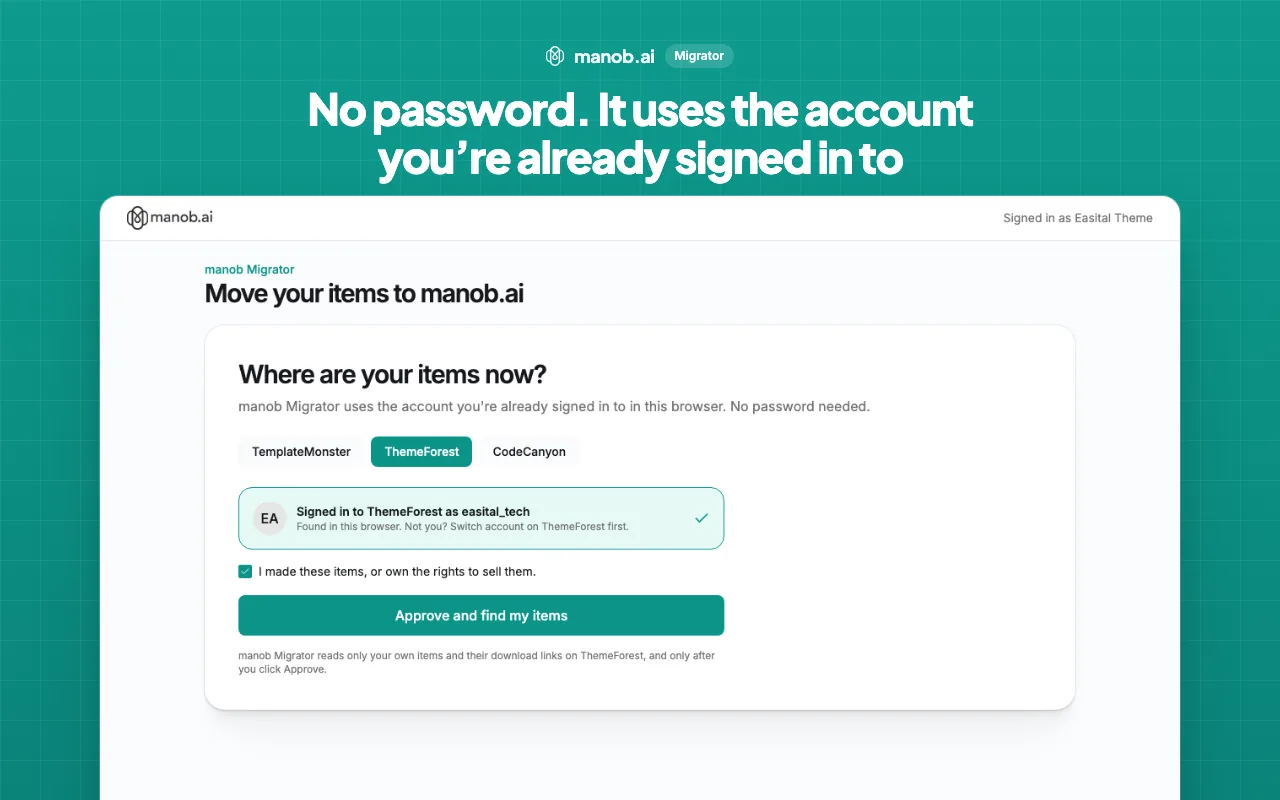
manob Migrator is manob.ai's own free Chrome extension. It copies your ThemeForest or CodeCanyon items to manob.ai, listing details and files included. It uses the Envato account already signed in in your browser, so you never type or share a password.
- Open the migrator. Go to manob.ai/migrator/start and sign in, or create a free seller account. You'll set up your seller profile first if you haven't yet.
- Add the extension. The page walks you through adding manob Migrator to Chrome. Edge and Brave work the same way.
- Pick ThemeForest or CodeCanyon. The page shows the account it found in your browser. Tick that you made the items or own the rights to sell them, then approve.
- Check the list. Each item is checked against manob.ai for its category, duplicates, demo and price, and marked Ready, Needs a fix, or already on manob.ai. Choose which ones to move.
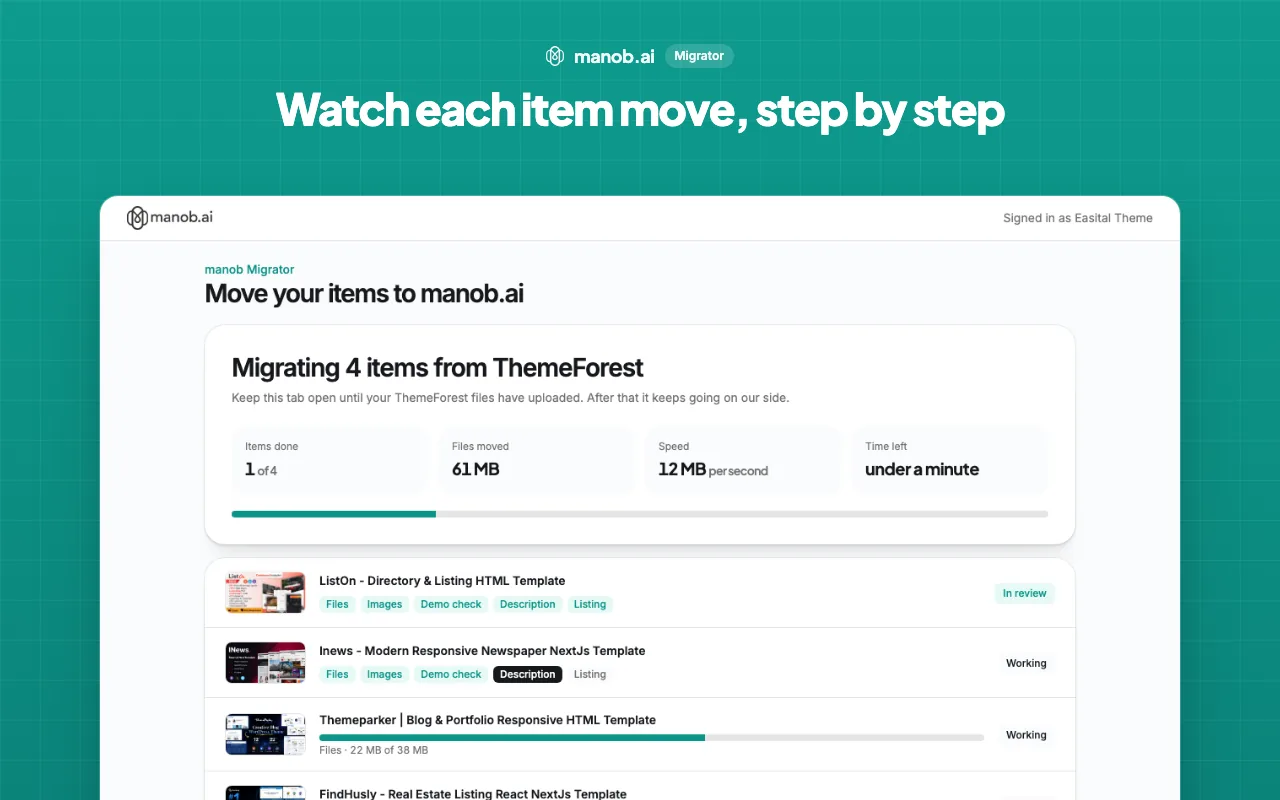
- Approve. Chrome asks once to let manob Migrator fetch your files. After that your files are fetched on manob.ai's side, so you can close the tab, or your laptop.
- Wait for review. Each item becomes a manob.ai listing and goes through the normal review. If something needs changing, you and the reviewer both get a note saying what.
For each item it copies the name, description and key features; your own Regular and Extended author prices (without Envato's buyer fee); the category, tags and specs; the live demo link, banner and screenshots; the documentation link; and the ZIP itself, which stays private until someone buys it. If the documentation is only inside the ZIP, manob.ai puts it online and links it for you.
ThemeForest and CodeCanyon sign in separately. If you sell on both, sign in on each site in the same browser and run the migrator once for each.
The manual way, item by item
If you'd rather copy items yourself, or you're moving to a marketplace without an import tool:
- Download your own file. Sign in and open your portfolio page (themeforest.net/user/your-username/portfolio, or the same on codecanyon.net). Each of your items has a Download link there. The item page and the Edit page don't have one.
- Make the images. Export a thumbnail in the new marketplace's size (1110 × 566 on manob.ai) and pick your best screenshots.
- Clean up the description. Keep the features and requirements. Remove Envato-only lines and support links that only work for Envato buyers.
- Fix the demo. Use your own demo address and remove buttons that send visitors to ThemeForest to buy.
- Upload and price it. On manob.ai, use Upload in your seller menu, set the Regular and Extended prices, and submit for review.
It works, but you repeat all five steps for every item, so a large portfolio takes a long time.
CodeCanyon items: scripts, plugins and apps
CodeCanyon items need a little more care than themes:
- Mobile apps (Flutter, React Native, Android or iOS source) often have no web demo. manob Migrator makes a page of the app's screens and links it as the demo. Swap in a video or store link later if you have one.
- WordPress plugins need a demo site with the plugin running, plus documentation that covers installation.
- Big source ZIPs can pass 200 MB once build folders or node_modules creep in. Ship the ZIP buyers actually need.
What to fix before you move
manob Migrator checks every item for these before it moves, and any marketplace reviewer will spot them too:
- The demo still shows the marketplace purchase bar, because it links to the marketplace's preview frame instead of your own demo.
- The demo has "Buy now" buttons that send buyers back to the marketplace.
- The demo link is broken, or points at an expired domain.
- There's no documentation link, and none inside the ZIP.
- The description is under 50 characters.
Fixing these once also makes your Envato listing better. Our guide to previewing a template before buying shows what buyers look at in a demo.
After you move: keep both listings in step
Ship every update to every marketplace with the same version number and changelog, answer support in one place, and decide how your prices will compare. We cover the details in selling the same theme on several marketplaces. For a wider look at where else to list, see our ThemeForest alternatives and CodeCanyon alternatives.
Frequently asked questions
Will moving my items affect my ThemeForest account?
No. manob Migrator only reads your own items and their download links. It doesn't change, unlist or delete anything on ThemeForest or CodeCanyon, and you keep selling there as before.
Do I have to remove my items from ThemeForest first?
No. Envato's author terms are non-exclusive, so the same item can be on ThemeForest, CodeCanyon and other marketplaces at once, and your 50% author fee stays the same.
Can I move items I bought on ThemeForest?
No. You can only list items you made, or own the rights to sell. A purchased license lets you use an item, not resell it, and manob Migrator asks you to confirm ownership before it reads anything.
How much does manob Migrator cost?
Nothing. Moving items is free. manob.ai takes its 35% commission only when an item sells, so you keep 65% of each sale.
Do I need to give manob.ai my Envato password?
No. The extension uses the ThemeForest or CodeCanyon session already open in your browser, so no password is typed, shared or stored.
Can I close the tab while it runs?
Yes. Once you approve and Chrome has let the extension fetch your files, the rest happens on manob.ai's side. Come back to the migrator page any time to see where it is.