
Fertility Clinic Website Templates: 6 IVF and Maternity Picks Across WordPress, HTML, PHP and React
By Manob Editorial ·
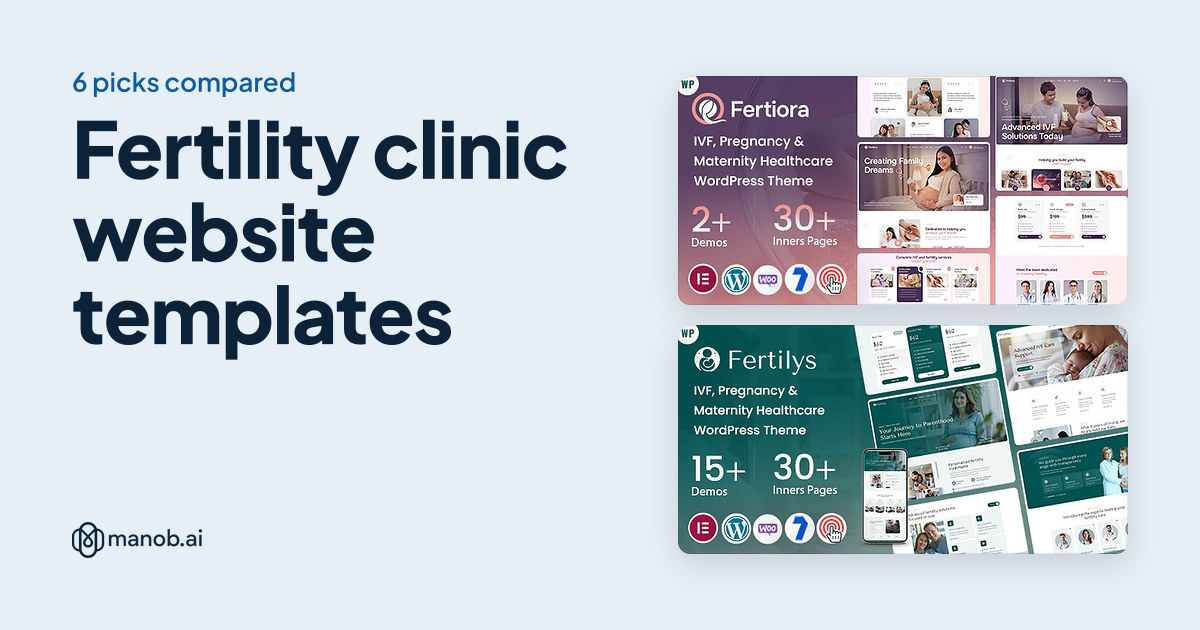
A good fertility clinic website template explains the treatment path calmly, makes booking a first consultation easy on a phone, and leaves room for doctors, services and contact details. We compared six options on Manob: three WordPress themes (Fertiora, Fertilys and Femora), plus Fertilys as an HTML, PHP and React template. Pick by how you plan to edit the site.
What a fertility clinic site needs
People who visit a fertility clinic site are often anxious, and many arrive late at night on a phone. The site has to answer a few questions fast: what treatments do you offer, who are the doctors, what happens at a first visit, and how do I reach you. A template cannot write that for you, but it can give you the right places to put it.
Look for these pieces before you compare designs:
- A service structure. IVF, intrauterine insemination, egg freezing, pregnancy care and maternity services each deserve their own page or section, so a visitor can find the one that applies to them.
- A contact or consultation form. The main action on the site is a request for a first appointment. The form should validate entries and be reachable from the header on every page.
- Doctor and team pages. Patients want to know who they will meet. Check that the template has a place for a short bio and a photo.
- A calm visual tone. Soft colors, readable type and plenty of white space matter more here than animation.
- Newsletter signup and maps. A mailing list for fertility tips and a map for directions are common extras.
- Language and direction support. If your patients read Arabic, Hebrew or another right-to-left language, check for RTL support. A multilingual clinic may also want WPML.
One more point: a fertility clinic site handles private health topics. A template gives you design and structure, but it does not make a form compliant with any health privacy rule. Talk to your host or a developer about how form submissions are stored and sent, and read the rules that apply where you practice.
For a wider view of clinic designs, our healthcare website templates roundup and the hospital website templates list cover general medical sites. For a WordPress-only view, see medical WordPress themes.
Fertility clinic template comparison
Six listings on Manob are written for IVF, pregnancy and maternity care. Three are WordPress themes. The other three are the same Fertilys design in HTML, PHP and React. The table shows each one with its type and price. Prices are live, so check the card.
| Template | Type | Built with | Price from | Live demo |
|---|---|---|---|---|
| Fertiora – IVF, Pregnancy & Maternity Healthcare WordPress Theme | WordPress theme | Elementor | $51 | Demo |
| Fertilys – IVF, Pregnancy & Maternity Healthcare WordPress | WordPress theme | Elementor | $51 | Demo |
| Femora - IVF, Pregnancy & Maternity Healthcare WordPress Theme | WordPress theme | Elementor | $51 | Demo |
| Fertilys – IVF, Pregnancy & Maternity Healthcare HTML | HTML template | — | $26 | Demo |
| Fertilys – IVF, Pregnancy & Maternity Healthcare PHP Template | PHP template | — | $20 | Demo |
| Fertilys – IVF, Pregnancy React Template | React template | React | $15 | Demo |
We write from each listing rather than from a hands-on build. Where we say "the listing shows," that is what the seller has put in the description and feature list. Use the live demo on each product page to judge the design yourself, which is the point of previewing before you buy.
WordPress themes for IVF and maternity clinics
WordPress suits a clinic that wants staff to add news, update doctor bios and change opening hours without touching code. All three themes below work with Elementor, which lets you edit sections visually. Our guide to installing a WordPress theme manually helps if the one-click route fails on your host.
Fertiora: best for a clinic that also wants a small shop
Fertiora is written for IVF and fertility clinics, maternity services and other healthcare providers. Its listing shows two index home layouts, predefined elements for healthcare and maternity content, and more than 30 Elementor shortcodes. Contact forms run on Contact Form 7 and WPForms, and there is a MailChimp newsletter signup form. WooCommerce integration is listed, which helps if you sell supplements, books or courses alongside your care. It also lists RTL support, parallax sections and a one-click demo import.
The honest limit: two home layouts is the smallest choice in this group. If you want video or slider homepages, look at Fertilys below. The listing also names Revolution Slider, so expect to learn a second tool next to Elementor.

Fertiora is a WordPress theme for IVF clinics, maternity services and healthcare providers. It includes healthcare-focused layouts, Elementor support, WooCommerce integration an…
Fertilys WordPress: best for a clinic that wants the most homepage choices
Fertilys is the widest set of starting points in the roundup. Its listing shows 4 home page layouts, 4 home video layouts, 4 home slider layouts and 4 single home layouts, so a clinic can try a video hero or a slider before committing to a design. It is built for IVF centers, pregnancy clinics and maternity providers. The list also includes Elementor integration, 30+ Elementor shortcodes, Revolution Slider, Contact Form 7 with MailChimp forms, WooCommerce and WPML compatibility, RTL support and a one-click demo import.
WPML compatibility is the reason to choose it for a clinic serving patients in more than one language. The limit is choice overload: with that many layouts, decide on one early so the site stays consistent. The listing says the theme supports WordPress 7.0.x down to 6.4.x, and it mentions Internet Explorer 9 support, which tells you the code is not brand new.

Fertilys is a WordPress theme for IVF centers, pregnancy clinics and maternity healthcare providers. It has 4 home page layouts, 4 video layouts, 4 slider layouts and 4 single h…
Femora: best for a doctor or small practice that wants a calm tone
Femora is aimed at clinics, hospitals and individual doctors working in IVF, pregnancy and maternity care. The listing shows two homepage layouts, a theme options panel, Revolution Slider, 30+ Elementor shortcodes, Contact Form 7 and MailChimp forms, RTL support and a one-click demo import. WooCommerce and WPML are listed as ready, and the listing says the theme is compatible with WordPress 7.0.x. Its description stresses a calm, clear tone across the pages, which is the right feel for this niche.
The limit is the same as Fertiora: two home layouts. The feature list is also close to Fertiora's, so compare the two demos side by side and pick the one whose colors and spacing feel right for your clinic.

Femora is a WordPress theme for IVF, pregnancy and maternity healthcare sites. It suits clinics, hospitals and doctors who want an Elementor-based site with two homepage layouts…
HTML, PHP and React versions of Fertilys
If you have a developer, or you do not need a content dashboard, the three code versions of Fertilys are an alternative. They share a design, so you pick by the tools you work with. Our HTML templates vs WordPress themes comparison explains the trade-off in more detail.
Fertilys HTML: best for a simple, fast clinic brochure site
The HTML version lists 21+ HTML files for healthcare pages and 2 index multi-page demos. It includes Revolution Slider banner areas, a Menuzord responsive megamenu, an Ajax contact form that validates entries, Google Maps set up through data attributes, and responsive video support. It is built with Bootstrap 5.x, HTML5, CSS3, SCSS and JS, with Inter and Tenor Sans fonts from Google Fonts.
Who should pick it: a clinic with a developer who will host static files and rarely change content. The limit is that you edit pages in code, and the contact form needs a mail handler on your server before it sends anything, so check what your host supports. The listing says demo preview images are not in the download.

Fertilys is an HTML template for IVF, pregnancy and maternity healthcare websites. It suits clinics, hospitals and fertility specialists, and includes 21+ HTML files and 2 multi…
Fertilys PHP: best for a host that already runs PHP
The PHP version has the same 21+ files and 2 index multi-page demos as the HTML one, but as PHP. The listing says it includes predefined web elements for medical, fertility, gynecology and maternity sites, Revolution Slider, the Menuzord megamenu, a working Ajax contact form with validation and Google Maps through data attributes. It is built with PHP and Bootstrap 5.x, with HTML, CSS, SCSS and JS for the front end, and a documentation file is included.
Choose PHP over HTML if you want to split a header and footer into shared includes so you edit them once. The limit is that your host must run PHP, and the listing does not describe a content dashboard, so editing is still done in files. Our PHP website templates guide covers that setup.

Fertilys is a PHP template for IVF, pregnancy and maternity healthcare sites, including clinics, hospitals and gynecology and fertility specialists. It includes 21+ PHP files an…
Fertilys React: best for a team already building in React
The React version suits developers who want component-based code. The listing shows 2 home versions, React JS with React Bootstrap, React Hooks, reusable components, CSS3 animations and retina-ready display. It also lists HTML, CSS, SCSS and JS files, Inter and Tenor Sans fonts, and an extensive documentation file. Because the code is split into components, a team can replace one section without rewriting a whole page.
The limit is that it only has two home versions and no content dashboard, so every text change goes through the code. It also suits teams that can host a React build. Our React templates roundup compares other options. The listing says the demo images are for illustration and are not included in the files you receive.

Fertilys is a React template for IVF and pregnancy healthcare sites. It includes 2 home versions, reusable components and HTML, CSS, SCSS and JS files for developers building on…
How to choose between WordPress, HTML, PHP and React
- Who will edit the site? If a coordinator or nurse manager will post updates, choose a WordPress theme (Fertiora, Fertilys or Femora). Elementor and the standard dashboard keep routine edits simple.
- Do you need more than one language? Fertilys WordPress and Femora list WPML compatibility. All three WordPress themes list RTL support.
- Do you have a developer? The HTML, PHP and React versions give a developer clean source files, but each edit is a code change.
- Do you want a shop or paid resources? All three WordPress listings mention WooCommerce.
- Will you start from a video or slider hero? Fertilys WordPress is the only pick here that lists video and slider homepage sets.
- Which license? Read our license terms to see whether a Regular or Extended license fits your use.
Whichever you pick, open the live demo on the product page before you buy, and check it on a phone-sized window. See the WordPress listing for more themes, or the full products page to browse by type.
When to look elsewhere
Six picks is a small set, and all of them share a design family or a similar feature list. If you want a very different look, browse a bigger marketplace or the free theme directory on WordPress.org. A free healthcare theme can be enough for a single-doctor practice with a one-page site. If nobody on your team wants to maintain a site, a hosted website builder takes care of hosting and updates for a monthly fee. And if your clinic needs patient records, online payments for treatment or secure messaging, a template alone will not do it. Look at a specialist patient-portal product, and ask a developer or our services page about custom work.
Frequently asked questions
What pages should a fertility clinic website have?
At least a home page, one page per treatment, a doctors or team page, a first-visit guide, a contact page with a consultation form, and a blog or news page. Add a frequently asked questions page if patients often ask the same things before booking.
Is a WordPress theme or an HTML template better for a clinic?
WordPress is better when non-technical staff need to update content. An HTML, PHP or React template is better when a developer manages the site and you want full control of the code. The comparison above shows which Fertilys version fits each case.
Can these templates handle more than one language?
Fertilys WordPress and Femora list WPML compatibility, and all three WordPress themes list RTL support. The code versions of Fertilys do not list a multilingual tool in their feature lists, so a developer would need to build that.
Can I preview a template before I buy?
Yes. Every item on Manob has a live demo you can open before you buy, and every item is manually reviewed before it goes live. Our guide on previewing a template before buying lists what to check.